

I still remember the first time I really noticed an open frame display in action. It was at a busy airport kiosk where I was printing a boarding pass. The screen felt completely part of the machine-no bulky bezels, no obvious "monitor" sticking out. It just worked smoothly under bright lights and constant finger jabs from travelers. That moment made me dig deeper into these unsung heroes of modern interfaces. If you're building or upgrading self-service systems, industrial controls, or interactive setups, understanding open frame monitors can save you a lot of headaches (and money).

In this guide, I'll walk you through what they actually are, why they matter in 2026, and the practical stuff I've learned from talking to integrators and seeing deployments firsthand. No fluff-just real insights to help you decide if an open frame display fits your next project.
Breaking Down What an Open Frame Display Really Is
At its core, an open frame display (or open frame monitor, open frame touchscreen) is basically a display panel without the fancy outer shell you see on a regular office monitor. You get the LCD itself, a sturdy metal chassis for support, the electronics, and often a touch layer-all ready to drop straight into your custom enclosure, kiosk, or machine.
The "open frame" name comes from that exposed design. Instead of a finished plastic case, you see the metal frame on the sides and back. This makes it incredibly easy for engineers to mount it using VESA holes, rear brackets, or edge flanges. I've seen teams bolt these into everything from sleek retail kiosks to rugged factory panels.
What sets them apart from a standard desktop monitor? A closed-frame unit comes fully dressed and ready for a desk. An open frame display is the bare-bones version built for integration. You customize the housing around it, which gives you that clean, flush-front look users love.
In practice, this design shines when space is tight or the environment is tough. One integrator I spoke with described it as "the invisible workhorse"-you don't notice it until it keeps running flawlessly for years.
Open Frame vs Closed Frame: What I've Seen in Real Deployments
Over the years, I've compared quite a few setups. Closed-frame monitors are convenient for quick office use, but they fight you during custom integration. You often end up stripping parts, risking warranty issues, and ending up with visible edges that break the user experience.
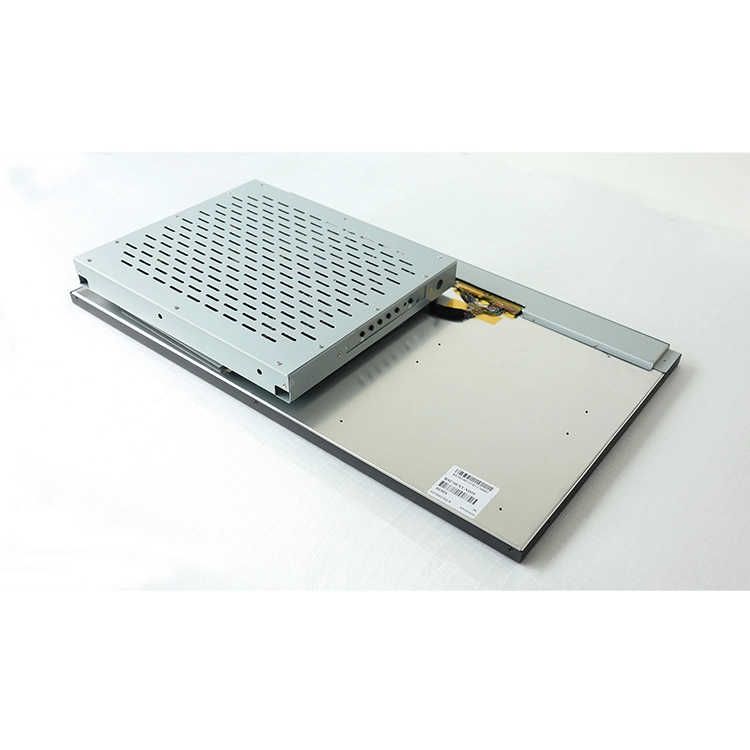
Open frame monitors flip that script. Their chassis gives structural strength while letting your enclosure handle the final aesthetics and protection. In high-traffic retail spots, this means a seamless glass front that looks premium. In factories, it means better heat dissipation and easier access for maintenance.
From what I've observed and from industry sources, open frame options usually win on durability too-many handle wider temperature ranges, vibrations, and 24/7 operation that would kill a consumer-grade screen.
Key Features That Actually Matter in the Field
Not all open frame displays are created equal. Here's what I pay attention to:
Sizes typically run from around 10 inches up to 32+ inches. Full HD is the sweet spot for most kiosks, but 4K is gaining ground for detailed industrial visuals. Brightness is crucial-250-500 nits works indoors, but I always recommend 700-1500+ nits plus anti-glare for anything near windows or outdoors.
Touch technology has matured a lot. Projected capacitive (PCAP) dominates now because it feels like your phone-smooth, multi-touch, and often glove-compatible for factory workers. Some projects still use IR or resistive for specific needs, like extreme dirt or stylus work.
Durability features I look for include IP65 front protection, wide temp tolerance (-20°C to 60°C in many cases), and solid shock resistance. These aren't marketing buzzwords; I've heard stories of screens surviving years in dusty warehouses where standard monitors failed in months.
Where Open Frame Displays Are Making a Real Difference
The applications are broader than you might think. In retail, they power self-checkout and information kiosks that reduce wait times and let staff focus on higher-value interactions. One ramen shop chain I read about used them to let customers order directly-faster service, happier diners.
On factory floors, open frame monitors serve as HMI panels for machine control and real-time monitoring. Automotive plants use them along assembly lines to cut downtime through quicker operator feedback. In transportation, you'll find them in airport ticketing and train info systems handling constant public use.
Healthcare facilities embed them in patient info terminals and equipment interfaces because the surfaces can be cleaned easily. Gaming arcades and vending machines love the ruggedness too. Even custom exhibits, like interactive walls in museums, benefit from the flexible mounting.
What surprises many people is how invisible they become. The technology fades away, and the experience takes center stage.
Why So Many Pros Choose Open Frame Displays
The advantages go beyond the spec sheet. The slim profile saves precious space inside enclosures. Customization is huge-you can spec exact brightness, touch type, and mounting to match your environment. Long-term reliability often translates to lower total ownership costs, especially with 50,000+ hour ratings on good units.
Compared to fully bare embedded LCD kits, open frame versions usually offer easier plug-and-play with standard interfaces while still giving you that chassis for mounting. Thermal management is often better too because of the open design.
I've also noticed better ROI in volume projects. You avoid paying for unnecessary consumer features and get something built for real commercial abuse.
Choosing the Right One: Lessons from the Trenches
Here's my practical advice after reviewing many options: Start with your environment. Dusty factory? Prioritize IP rating and vibration resistance. Bright retail space? Don't skimp on nits and anti-glare.
Consider future-proofing-will you need multi-touch? Glove support? Specific interfaces for your single-board computer or industrial PC? Talk to suppliers early about samples. Brands like Elo, ViewSonic, and Advantech have solid reputations, but always test in your actual conditions.
Budget wisely: Cheaper units might seem attractive until they fail prematurely in 24/7 use.
Installation Tips and Keeping Them Running
Mounting is usually straightforward with standard patterns, but plan cable routing and ventilation from day one. In the field, regular gentle cleaning and surge protection make a big difference. Many units now support easier module access, which cuts downtime during repairs.
Wrapping Up: Are Open Frame Displays Right for You?
After seeing dozens of deployments, I'm convinced open frame displays and open frame monitors are one of the smartest choices for anyone serious about reliable, integrated interactive systems. They strike that perfect balance between flexibility, toughness, and clean design that modern applications demand.
As we move further into automated retail, smarter factories, and seamless public services, these displays will only become more important.


If you're working on a custom project and need something tailored, check out MINGHUA. We specialize in custom LCD solutions, including open frame displays built to your exact specs-whether that means special sizes, brightness levels, rugged features, or full integration support. Our team has helped many clients turn challenging requirements into reliable, high-performing systems. Reach out to us at Minghua; we'd love to discuss how we can support your next build and deliver exactly what you need.


