

Hey everyone, if you've ever stared at a massive outdoor LED billboard flashing ads, or watched a concert stage light up with crystal-clear video walls, you've probably wondered: how does an LED display control system actually make all that happen? It's not magic-it's a clever mix of hardware, software, and some smart engineering that turns raw data into vibrant visuals.
Today, we're diving deep into LED display control systems-what they are, how they're built, the key technologies involved, and why they matter in today's digital signage world. We'll keep it straightforward, like we're chatting over coffee, but packed with real details. And since our team at Minghua Display specializes in custom LCD displays (think tailored screens for industrial, medical, or commercial use), we'll touch on how these principles overlap with LCD tech too-because sometimes the best solution isn't LED at all.
Let's start from the basics.
What Exactly Is an LED Display Control System?
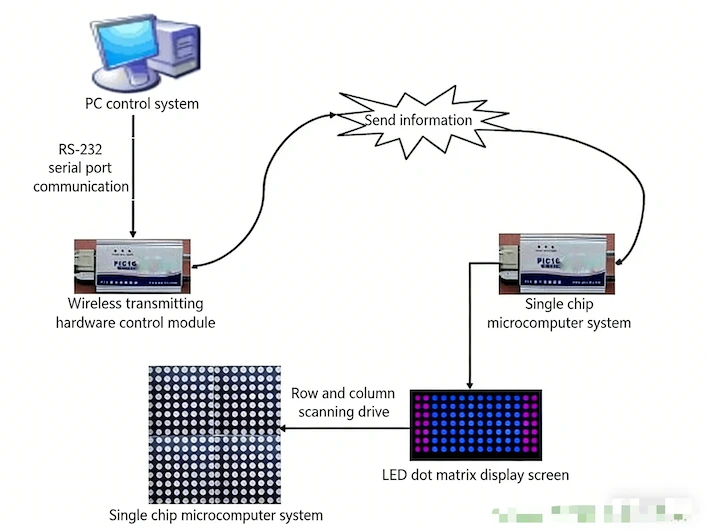
At its core, an LED display control system (sometimes called an LED controller, control card, or just the "brain" of the screen) is the hardware and software combo that takes your content-images, videos, text-and makes sure every single LED pixel lights up at the right time, with the right brightness and color.
Think of it this way: the LEDs themselves are just tiny light bulbs in a giant grid. Without control, they're useless. The control system receives signals (from a computer, media player, or even live feed), processes them, stores frames if needed, and then drives the LEDs row by row or in arrays to create the picture.
Modern systems fall into two main categories:
- Synchronous control: Real-time, perfect for live events, concerts, or anything needing zero delay. It mirrors what's on your computer screen exactly.
- Asynchronous control: Offline mode-upload content once (like ads or schedules), and it plays independently. Great for billboards, retail signs, or info boards.
From what we've seen in the industry (and from tons of searches people do like "LED display control system how it works"), most folks want to know the architecture: how data flows from input to pixel.
The Overall Architecture: Breaking Down the Key Parts
A typical LED display control system has these main pieces working together:
- Content Source - Your PC, laptop, video processor, or even a cloud server.
- Sending Card / Transmitter - Sits near the source. It grabs the video signal (HDMI, DVI, DP, etc.), processes it, and sends it over long cables (often Ethernet or fiber) to the display.
- Receiving Cards - One (or more) per cabinet/module in the LED screen. These decode the data, map it to specific pixels, handle brightness/gray scale, and send drive signals to the LEDs.
- LED Driver ICs - The chips right on the modules that control current to each LED for color and brightness (PWM for grayscale is common).
- Power Supplies & Cabling - Stable power and clean data lines-super important to avoid flickering or color shifts.
- Control Software - The user-friendly part. Programs let you edit content, schedule playlists, adjust brightness based on ambient light, or even monitor the screen remotely.
The data flow is straightforward: Input → Processing (scaling, color correction) → Transmission → Distribution to receiving cards → Pixel-level drive → Light up!
For smaller setups, like text signs, you might just have a simple control card with USB/SD card input. For big video walls, it's full synchronous systems with video processors handling 4K or higher.
How Scanning and Driving Actually Happen
One of the coolest (and most searched) parts is scanning modes. LEDs aren't lit all at once-it's too power-hungry. Instead, we scan rows or columns quickly.
- Static scanning (1/1): Every pixel gets direct control. Best brightness and quality, but expensive for huge screens.
- Dynamic scanning (like 1/8, 1/16, 1/32): Lights multiple rows in sequence super fast (hundreds of times per second). Saves power and cost, but can cause slight brightness loss if not done right.
Modern "array" or distributed control (vs old centralized) boosts refresh rates to 120Hz+, grayscale to 1024+ levels, and cuts power loss dramatically-from 30-40% in old systems to 8-10% now. That means brighter screens or lower energy bills-real savings for big installs.
For example, on a large outdoor full-color screen, switching to array-style control can save 20%+ on power. We've crunched similar numbers for clients, and it adds up fast over years.
Advanced Features You See in Today's Systems
People searching for "LED display control system principles" often hit on these upgrades:
- High refresh & grayscale - No flicker, smooth video, true-to-life colors.
- Single-pixel detection & calibration - Auto-detect dead LEDs, or correct brightness/color drift over time (LEDs age differently-blue fades fastest).
- Energy-saving tech - Better scanning means less current waste.
- LVDS or high-speed transmission - Reduces signal loss over distance, keeps everything synced with no color blocks.
Software side: Editing tools let you draw, type text, add effects (scroll, flash), preview, and batch-upload multiple screens. Wireless or serial comms (RS232/485) handle uploads in older systems; now it's often Ethernet/WiFi/cloud.
LED vs. LCD: Why We Focus on Custom LCD at Minghua Display
Here's where it gets interesting. While LED rules big outdoor/advertising spaces (high brightness, huge sizes), LCD still dominates indoors-think kiosks, medical monitors, industrial HMIs, or point-of-sale terminals. LCD offers better pixel density, consistent backlighting, and often lower cost for smaller-to-medium sizes.
At Minghua Display, we specialize in custom LCD displays-from tiny 2.8" UART modules to large high-brightness panels with capacitive touch. Need sunlight-readable TFT LCD? We customize brightness, interfaces (MIPI, LVDS, RGB), cover glass, or even full assemblies with PCAP touch.
- Unlike off-the-shelf stuff, our custom approach means:
- Exact size and resolution to fit your enclosure.
- Tailored interfaces (UART for simple MCU control, or HDMI for video).
- Special treatments: anti-glare, waterproof, wide temp range.
- Fast prototyping-sometimes in days.
If your project involves info displays, dashboards, or embedded systems, an custom LCD from us might outperform a generic LED setup in power, clarity, or integration.
We've helped clients in medical, automotive, and retail swap to tailored LCDs and cut costs while boosting reliability.
Wrapping It Up: Why Understanding Control Systems Matters
Whether it's LED or LCD, the control system is what turns a bunch of pixels into something meaningful. For LED, it's all about fast scanning, high refresh, and efficient driving to handle massive resolutions without melting power supplies.
The tech has come a long way-China now leads global production, but innovation keeps pushing boundaries (Mini/Micro LED anyone?).
If you're building a project and scratching your head over LED display control systems or thinking a custom LCD display might be a better fit, drop us a line at Minghua Display. We're happy to chat specs, send samples, or brainstorm your exact needs.
Got questions? Fire away in the comments-what kind of display project are you working on?


