

Hey folks, if you've ever plugged in a new LCD module to your embedded board-whether it's an industrial HMI, medical device, or some custom IoT gadget-and stared at a black screen, random lines, or flickering mess, you're definitely not alone. Integrating LCD displays into embedded systems is one of those things that looks simple on paper but can turn into hours (or days) of frustration in the lab.
I've been through this countless times with TFT LCD modules, high-brightness LCDs, and everything in between. The good news? Most of these headaches come down to just a handful of compatibility and timing issues. Let's walk through the 7 most common problems when integrating LCD modules into embedded/industrial devices, why they happen, and the practical fixes that actually work.
Interface Mismatch (MIPI vs RGB vs SPI vs MCU – The Classic Gotcha)
You order a shiny new LCD module with MIPI DSI interface, but your MCU only has RGB or SPI pins. Or worse, the datasheet says "compatible with RGB" but the timing parameters are completely off.
Why it happens Different interfaces have different speed, pin count, and signal requirements. MIPI is high-speed differential, RGB (DPI) is parallel and pixel-clock heavy, SPI is slow but simple, and MCU interfaces expect direct register access. Mismatches lead to no display, garbage data, or nothing at all.
Quick fixes
- Double-check the interface type in both the LCD module datasheet and your MCU reference manual.
- Use adapter bridges (e.g., SSD2828 for RGB-to-MIPI) if needed.
- For SPI/MCU, ensure your clock polarity (CPOL/CPHA) matches exactly.
Initialization Code Fails (Black Screen / White Screen After Power-On)
You send the init sequence... and nothing. Or you get a white screen that never clears.
Why it happens Most LCD modules (especially MIPI DSI or GRAM-based ones) require a precise sequence of commands sent over SPI/I2C or DSI commands. Wrong order, missing delays, incorrect reset timing, or even wrong power-up sequence = dead screen.
Fixes that save sanity
- Copy the exact init sequence from the panel datasheet (not generic ones).
- Add proper delays (e.g., 10–120ms after SLPOUT, 100ms after DISPON).
- For MIPI DSI, make sure the host initializes first (use prepare_upstream_first in device tree if using DRM).
- Probe the reset pin with a scope to confirm timing.
This is what proper MIPI DSI timing should look like (CLK, data lanes syncing up):

Refresh Rate / Frame Rate Problems (Tearing, Stuttering, or Flicker)
Screen tears, looks jerky, or flickers randomly.
Why it happens VSYNC/HSYNC/DE signals are misconfigured, pixel clock is too high/low for your LCD module, or bandwidth is choked (especially with PSRAM on ESP32/ESP32-S3).
Solutions
- Match the pixel clock (PCLK) to your panel spec (usually 10–65 MHz for most TFTs).
- Enable tearing effect (TE) signal if your module supports it.
- In Linux/Android drivers, fix device tree timings (hfront-porch, hback-porch, etc.).
- Lower resolution temporarily to test.
Power Supply Ripple Causing Flicker or Instability
Display flickers when CPU load changes or motor spins nearby.
Why it happens LCD modules are super sensitive to power noise on VDD/AVDD/VGL/VGH rails. Ripple >50mV can cause visible artifacts.
Easy wins
- Add 100nF + 10uF decoupling caps close to every power pin.
- Use LDO instead of buck for analog rails if possible.
- Measure ripple with scope (AC coupling) – aim for <30mV.
EMI / Noise Causing Random Lines or Snowflakes
You see intermittent horizontal/vertical lines or snow, especially in noisy environments.
Why it happens Long cables, poor grounding, switching regulators, or missing shielding create EMI that corrupts MIPI/RGB/SPI lines.
Practical fixes
- Twist differential pairs (MIPI), use short cables, add ferrite beads.
- Proper ground plane + star grounding.
- Shielded FPC if your LCD module uses one.
Linux/Android Driver Bugs (Device Tree / Kernel Issues)
Works in U-Boot but black in Linux, or driver crashes.
Why it happens Device tree timings wrong, probe order issue (e.g., regulator before panel), or kernel driver doesn't support your panel's quirks.
Fixes
- Use EPROBE_DEFER for dependencies.
- Copy working panel node from similar drivers (e.g., simple-panel or panel-simple).
- Enable debug in DRM/KMS to see probe errors.
Tools You Actually Need for Debugging
Don't guess-measure.
- Oscilloscope: Check signal integrity, rise/fall times, noise.
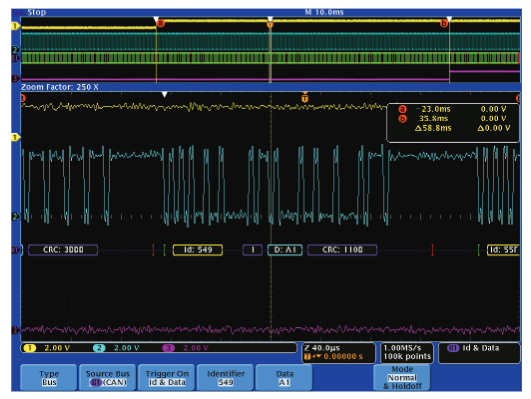
- Logic analyzer: Decode SPI/I2C/MIPI commands, check protocol sequence.
Here's a typical setup with a logic analyzer capturing SPI init for an LCD module:
And a developer in the trenches debugging a stubborn display:
Wrapping Up
Integrating LCD modules into embedded systems is rarely plug-and-play, but once you nail the interface compatibility, init sequence, timing, and power cleanliness, most headaches disappear. Start with the datasheet, measure everything, and iterate.
If you're working on a tough custom LCD integration, high-brightness LCD for outdoor use, or need fully tailored TFT LCD modules with specific interfaces (MIPI, RGB, LVDS, SPI), that's exactly what we specialize in at Minghua Display.
Special Recommendation from Minghua Display
As experts in custom LCD modules and high-brightness LCD displays (1000–5000 nits range), we help engineers and companies tackle exactly these integration nightmares every day. Whether you need sunlight-readable high-brightness LCD for industrial HMI, medical-grade panels with custom interfaces (MIPI DSI, RGB, LVDS, SPI/MCU), or fully bespoke custom LCD solutions with optical bonding, touch, cover glass, and wide-temperature operation – we've got the experience to make it work smoothly.
We handle everything from concept to mass production: custom FPC design, precise timing adaptation, driver optimization for Linux/Android/RTOS, and rigorous reliability testing. No more black screens or flickering surprises.
Planning a 2026 project? Reach out now for priority consultation + our latest high-brightness LCD roadmap.


