

You know that feeling when you've had your monitor or TV for a couple of years and suddenly the whites look a bit yellowish, or certain areas seem off in color? I've been there myself. A few years ago, my main work monitor started developing a noticeable warm tint on one side. At first I thought it was my eyes playing tricks, but it turned out to be a classic case of LCD Screen Discoloration.
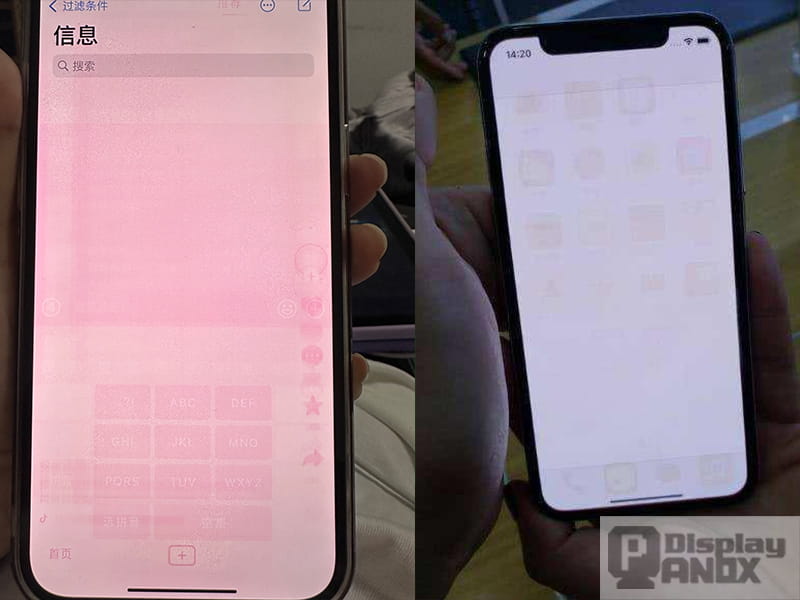
After dealing with this issue for both personal setups and client projects, I decided to write this down. If you're frustrated with your screen changing colors, here's what I've learned from real experience and talking with engineers in the industry.
My Experience with LCD Screen Discoloration
It usually starts subtly. One day the screen looks normal, then over months you notice the whites aren't as crisp, or dark scenes in movies have a strange cast. This is LCD Screen Discoloration - when the colors on your LCD screen start shifting or becoming uneven over time.
I've seen it happen on everything from cheap office monitors to higher-end TVs. The most common form is overall yellowing, but sometimes you get patchy areas or one corner looking different from the rest. It's annoying because it affects everything you do - whether you're editing photos, watching films, or just browsing.
What Actually Causes LCD Screens to Discolor?
From what I've gathered, the main problem comes down to how LCD panels are built. The polarizer films and color filters inside are made of organic materials that slowly break down with heat and light exposure. LED backlights, while more efficient than the old ones, still produce enough heat to speed this up.

Other things that make it worse:
- Running the screen at maximum brightness for long hours
- Poor ventilation (especially laptops left on beds or in hot rooms)
- Direct sunlight hitting the screen over time
- Cheap adhesives or materials used in lower-end panels
I remember one factory client who had an entire batch of industrial screens develop yellowing within 18 months because they were installed in a hot, poorly ventilated control room. That taught me how environment plays a huge role.
How Bad Can This Problem Get?
For casual users, mild LCD Screen Discoloration might just be irritating. But if you do color-sensitive work like graphic design or video editing, it becomes a real headache. The colors you see are no longer accurate, which can mess up your final output.
In professional settings it's even more serious. Medical imaging screens with color shifts can lead to misdiagnosis. Security monitoring systems might miss important details if colors are off. I've had clients replace entire fleets of displays because the discoloration affected daily operations.
How to Check If Your Screen Has Discoloration
Here's a simple way to test it yourself. Turn off the room lights, open a pure white webpage or image, then try gray and black backgrounds. Look carefully - do you see any yellowish tint? Are there cloudy patches or areas that look different?
I usually recommend testing with several solid colors too. If the issue stays consistent no matter what you're displaying, it's likely the panel itself rather than a loose cable or graphics setting.
Some people use free online test tools, which can help reveal problems you might miss during normal use.
What Can You Actually Do About It?
Prevention is much easier than fixing. I now keep my own screens at around 60% brightness and make sure they have good airflow. A simple screen protector that blocks UV can also help if your setup gets any sunlight.

If discoloration has already started, software calibration can sometimes improve it by adjusting color temperature - adding more blue to counteract the yellow. But for serious cases, there's often no perfect fix other than replacing the panel.
The good news is that newer panels in 2026 are using better materials that resist aging better than older ones, but they're not completely immune.
Tips When Buying a New Screen
If you're in the market for a new display, here's what I tell friends and clients:
- Don't go for the absolute cheapest models if you plan to keep it for years
- Check recent user reviews specifically talking about long-term color stability
- For important work, consider displays made for commercial or industrial use
- Always test the new screen thoroughly in a dark room during the return period
FAQ
Q: Can you fix yellowing on an LCD screen?
A: Mild cases can be improved with calibration, but heavy discoloration usually needs a panel replacement.
Q: Is this considered a defect?
A: Most manufacturers treat it as normal aging after a year or two, so warranty coverage is hit or miss.
Q: How long should a good LCD screen last before discoloration?
A: With normal use, 4 to 6 years is typical before you start noticing changes, though some last longer.
Q: Are newer technologies better?
A: Mini-LED and OLED have their own issues, but traditional LCD yellowing is still very common.
Final Thoughts
LCD Screen Discoloration is frustrating because it happens so gradually you almost don't notice until one day it's obvious. The best approach is prevention through smart usage and choosing quality panels from the start.
If you're working on projects where standard screens keep letting you down - whether due to color issues, size limitations, or harsh environments - going custom can make a big difference.


At Minghua, we specialize in custom LCD solutions. We help clients develop displays with better color stability, improved thermal design, and enhanced longevity to reduce problems like LCD Screen Discoloration. Whether you need a special size, higher durability, or optimized performance for your specific application, our team works directly with you to build exactly what you need. If you're tired of fighting the same display problems, feel free to reach out for a conversation.
Have you dealt with screen yellowing or color issues before? Share your experience in the comments - I read them and it helps me understand what people are actually struggling with.


