

If you've been shopping for LCD modules or specifying touch displays for a new product, you've probably seen terms like In-Cell, On-Cell, and OGS thrown around in spec sheets. A lot of people just nod and move on without fully understanding the differences. Don't worry - you're not alone.
In this guide, we'll break down what does in-cell screen mean in simple terms, how in-cell display technology actually works, how it stacks up against the alternatives, and when it makes sense for your project. Whether you're building a compact industrial HMI, a medical handheld, a car infotainment system, or an IoT device, this should help you make a smarter choice.
What Is an In-Cell Screen?
An in-cell screen (also called an in-cell display or in-cell touch screen) is a touchscreen where the touch-sensing elements are built directly into the LCD panel itself, instead of being added as a separate layer on top.
In older touchscreen designs, you had a stack of parts: a protective cover glass, a dedicated touch panel, sometimes an air gap, and then the actual LCD display underneath. All those extra layers made the assembly thicker, heavier, and could reduce image quality because of reflections and light loss.
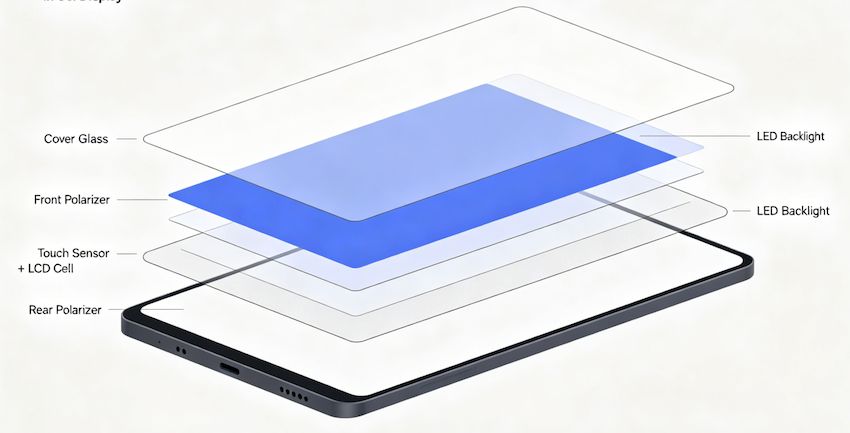
With in-cell display technology, the touch sensors are embedded right inside the LCD layer. Display and touch functions share the same space. The result is a much slimmer, lighter module with better optical performance.
How Does In-Cell Touch Technology Work?
At a basic level, when you touch the screen, your finger changes the local capacitance. In an in-cell touch screen, the sensors that detect this change are integrated into the pixel layer of the display. The touch controller and display driver often work closely together (sometimes even sharing the same chip in newer designs).
Because there are fewer layers for light to travel through, in-cell displays usually deliver higher brightness and better clarity - often with light transmittance above 90%. The stack is simpler: cover glass → front polarizer → touch sensor + LCD cell → rear polarizer → backlight.
One practical note: this tight integration means you usually need a specific touch IC to handle noise and signal filtering properly. It's more technically demanding than simpler touch methods.
In-Cell vs On-Cell vs OGS: What's the Real Difference?
Here's the comparison most people actually care about:

- In-Cell: Touch sensors are embedded inside the LCD pixel layer. It's the most integrated option - touch and display become one unified structure. This makes it the thinnest and optically cleanest of the three.
- On-Cell: The touch sensors sit on top of the LCD panel but still under the cover glass (usually between the color filter and polarizer). It's a middle-ground approach - thinner than fully separate touch panels, but not as integrated as in-cell.
- OGS (One Glass Solution): The touch sensors are patterned directly onto the protective cover glass itself. No separate touch film needed, but the touch layer is still outside the actual display panel.
Quick comparison:
| Feature | In-Cell | On-Cell | OGS |
|---|---|---|---|
| Touch layer position | Inside LCD panel | On top of LCD, under cover glass | Integrated into cover glass |
| Overall thickness | Thinnest | Medium | Thin |
| Optical clarity | Excellent | Good | Good |
| Touch sensitivity | High | Medium-High | High |
| Manufacturing complexity | Highest | Medium | Medium |
| Cost | Higher | Medium | Lower |
| Repairability | Most difficult | Easier | Moderate |
| Best for | Premium/slim devices | Mid-range & automotive | Cost-sensitive products |
In-cell wins on thinness and image quality, but it comes with higher cost and less flexibility for repairs or heavy customization.
Advantages of In-Cell Display Technology
- Slimmer and lighter design: You can shave 20–30% off the module thickness, which is huge for handheld devices, wearables, or anything with tight space limits.
- Better image quality: Fewer layers mean less reflection and light loss, so colors look crisper and brightness is more efficient.
- Faster, more accurate touch: Shorter signal paths and less interference usually give snappier response - helpful for precise applications like medical interfaces or industrial controls.
- Lower power use: Better light efficiency can reduce backlight power by 10–15%, which matters a lot in battery-powered products.
- Modern look: Easier to achieve narrow bezels and edge-to-edge designs.
Disadvantages of In-Cell Touch Screen
It's not perfect for every situation:
- Higher cost and complexity: Manufacturing is trickier, yields can be lower, and the panels generally cost more.
- Repair headaches: If the touch fails, you often have to replace the entire display assembly - not just the touch part.
- Less customization flexibility: Non-standard sizes or unusual requirements can be harder (and more expensive) to source compared to more modular touch solutions.
- Not always ideal for harsh environments: Extreme temperatures, heavy vibration, chemicals, or frequent field repairs may favor simpler, more rugged out-cell or On-Cell setups.
Where In-Cell Displays Are Commonly Used
- Smartphones and tablets: This is where in-cell touch screen technology really took off. Most flagship phones use some form of it for the slim profile and premium feel.
- Industrial handheld terminals: Logistics scanners, field service devices, and warehouse tools benefit from the thinness and better outdoor readability.
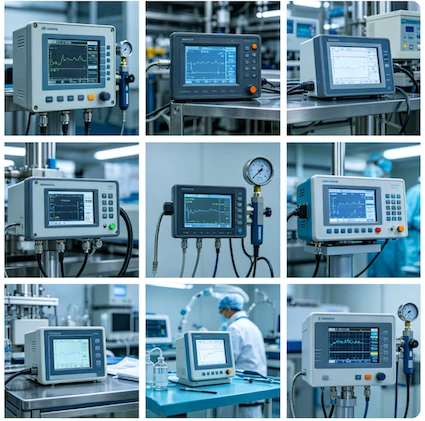
- Medical equipment: Patient monitors, portable diagnostics, and surgical interfaces often value the clarity and compact size.
- Automotive systems: Dashboards and infotainment screens that need to look sleek and integrated.
- Consumer IoT and smart home panels: Anywhere a clean, modern display is front-and-center.
Is In-Cell Right for Your Industrial or Custom Project?
It depends. In-cell display technology shines when you need the thinnest possible design, excellent image quality, and responsive touch in a relatively controlled environment. It's great for premium HMIs, compact portables, or products where every millimeter and gram counts.
However, if your application involves wide temperature ranges, heavy mechanical stress, frequent field service, tight budgets, or very custom sizes, a traditional TFT with separate touch (or On-Cell/OGS) might be more practical.
When working with a custom manufacturer, you can still tweak things like brightness, cover glass treatments (anti-reflective or anti-glare), touch sensitivity for gloves/styluses, interfaces (MIPI, LVDS, etc.), and even add optical bonding for extra ruggedness.
Quick Decision Guide
Lean toward in-cell if:
- Slim form factor and great visuals are top priorities
- You're okay with higher unit cost for better user experience
- The device stays in controlled or light-industrial settings
Consider alternatives if:
- Cost, repairability, or extreme durability matter more
- You need highly custom sizes or shapes
- The environment is rough (vibration, chemicals, wide temps)
Wrapping It Up
So, what does in-cell screen mean? In short, it's a smart way to integrate touch sensors directly into the display panel, giving you a thinner, lighter, and optically better in-cell touch screen compared to older stacked designs.
It brings real benefits in form factor and performance, which is why it's popular in high-end consumer devices and making inroads into industrial, medical, and automotive applications. But it's not a one-size-fits-all solution - weigh the trade-offs against your specific needs.
If you're evaluating options for a custom LCD project and want honest advice on whether in-cell display (or something else) fits best, feel free to reach out. A good manufacturer can walk you through the specs and help spec the right module without pushing one technology over another.


If you're working through that decision and want a manufacturer who can help you evaluate the options honestly - and build a custom solution around whatever you choose - that's exactly what we do at Minghua Display.


