

Ever noticed a shadowy patch or a stubborn black dot on your screen that just stays there no matter what image you put up? That's what we call an LCD screen dark spot. These things can be sneaky - they don't always jump out at you right away, but once you see one, it's hard to stop noticing it.

The frustrating part is that dark spots on LCD screen are often more troublesome than bright spots. They're tougher to catch during incoming checks, they tend to show up gradually over time, and they can point to bigger problems inside the panel. In industrial machines, medical equipment, or any serious B2B display application, even one LCD screen dark spot can cause failed inspections, warranty headaches, and reliability issues down the road.
Here's a practical breakdown of what an LCD screen dark spot really is, the common LCD dark spot causes, how to actually find them, and what you can do to keep them from messing up your project.
What Is an LCD Screen Dark Spot?
"Dark spot" is a catch-all term that covers a few different issues. Basically, it's any area on the display that looks darker than the rest - sometimes completely black, sometimes just noticeably dim. The small ones are usually about the size of a soybean, while bigger ones can be closer to thumb-sized.
One thing that makes dark spots on LCD screen tricky is that they're often not very obvious when you look straight at the screen. You usually notice them more clearly when viewing from an angle. That's why checking panels from different directions during inspection is so important.
Common Types of LCD Screen Dark Spots
From what I've seen, dark spots usually show up in these ways:
- Small Fixed Black Dots These are typically dead pixels - a single pixel whose transistor has completely failed, leaving a tiny permanent black spot that never lights up.
- Localized Dark Patches These look like cloudy or shadowy darkened areas rather than sharp dots. They're more often tied to backlight or structural problems than single pixel failures.
- Edge Shadows and Corner Dimming On larger panels you sometimes get slight darkening near the edges or corners because the backlight doesn't reach those areas as strongly.
How Dark Spots Differ from Other Defects
It's easy to get these mixed up, so here's the quick difference:
- Dark Spots vs. Dead Pixels: A dead pixel is one kind of LCD screen dark spot - just a single pixel stuck off. But many dark spots are bigger and come from backlight or mechanical issues.
- LCD Mura Dark Spots: Mura is that soft, cloudy unevenness across the screen with blurry edges. It shows up best on gray backgrounds. A true LCD display dark spot defect is usually more localized and has sharper boundaries.
- Dark Spots vs. Pressure Damage: Pressure is a very common cause. Pushing too hard on the screen can misalign the liquid crystals, and the dark spot might not appear until hours or days later.
- Dark Spots vs. Backlight Uniformity: General uneven backlight creates a smooth gradient. Real dark spots are more concentrated in specific areas.
LCD Dark Spot Causes – Why They Show Up
LCD dark spot causes usually come down to a few main areas:
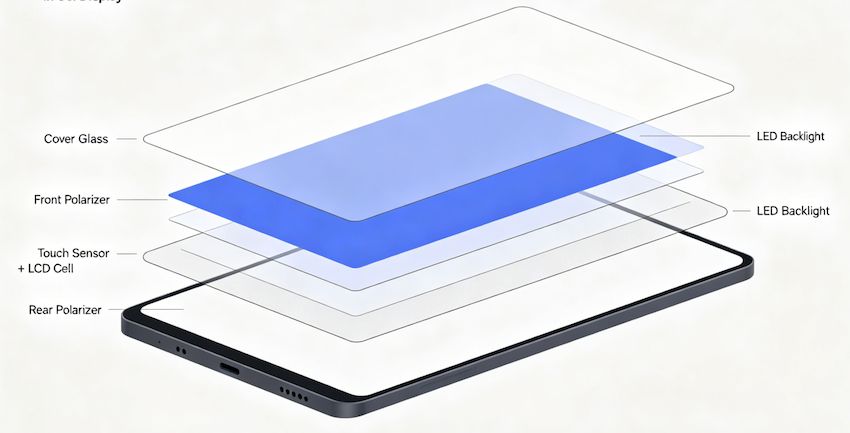
- Backlight Problems
This is the biggest culprit for dark spots on LCD screen. Since the LCD cell doesn't make its own light, anything wrong with the backlight shows up as darker zones. LEDs can fail or dim early, especially in equipment that runs 24/7. Cracks, dirt, or aging in the light guide plate can create dark patches. If the diffuser films shift or wrinkle, light gets blocked in certain spots and you see dim areas.
- LCD Cell and TFT Issues
Tiny dust particles trapped inside the cell during manufacturing can block light and cause permanent dark spots. When the TFT transistor fails, the pixel (or group of pixels) stays off - creating black spots on TFT LCD. Poor materials or alignment problems in the cell can also lead to localized darkening.
- Mechanical Stress
Pressing on the screen is the obvious one, but assembly stress is just as common. Over-tightened screws, bad bezel design, or awkward FPC routing can put uneven pressure on the panel. The damage often doesn't show up right away - it can take time for the liquid crystals to settle and create visible LCD display dark spot defect.
- Manufacturing Defects
Issues during bonding, air bubbles in OCA adhesive, poor sealing that lets moisture in, or contamination can all trigger dark spots. Heat and humidity during or after production make these problems worse over time.
How to Detect LCD Screen Dark Spots
Finding these defects takes the right method:
- Show a full white or gray screen in a dimly lit room and look at the panel straight on and from different angles. Testing several gray levels helps catch subtle dimming that's invisible on pure white.
- Good factories also use Automated Optical Inspection (AOI) with cameras that measure brightness across the whole panel. This catches the sneaky ones that human eyes miss.
Standards like ISO 13406 give some allowance for pixel defects, but industrial and medical projects usually demand much stricter limits - often close to zero defects.
The Real Impact on Your Project
A LCD screen dark spot isn't just cosmetic. In an industrial HMI or medical monitor it can hide important information. In tough environments (high heat, constant use), small dark areas can get worse over time. Replacing a panel in the field is expensive - not only the cost of the module, but also downtime, labor, and possible re-certification.
How to Prevent Dark Spots on LCD Screens
Fixing a dark spot after it appears is difficult and often not fully possible. That's why prevention is the way to go.
For how to fix dark spots on LCD, the best approach is stopping them before they start:
- Choose LEDs with tight binning and design the light guide plate for even light spread.
- Make sure the housing distributes pressure evenly and doesn't squeeze the active area.
- Run proper cleanroom controls and aging tests (at least 48–72 hours at higher temperature) to catch hidden issues early.
Why Custom LCD Design Makes Sense
With standard off-the-shelf panels, you're mostly stuck with inspecting and rejecting bad ones. Custom LCD modules let you tackle LCD dark spot causes right from the design stage.

At Minghua Display we build custom TFT LCD solutions that focus on backlight uniformity, low-defect panels, and mechanical structures that reduce stress. We work with customers to set the exact dark spot acceptance criteria they need. Many of our industrial and medical clients have seen far fewer field complaints after switching to this approach.
Choosing a Good Supplier
Don't settle for vague answers. Ask things like:
- Do you have a written standard for LCD screen dark spot rejection?
- Can you support very low or zero defect levels?
- Do you run aging tests and provide inspection reports?
- What's your cleanroom setup and AOI capability?
Can You Actually Fix Dark Spots on LCD?
Sometimes, but usually not completely. If it's a stuck pixel, running pixel-cycling software for a while can sometimes bring it back. Minor pressure-related spots might improve slightly if you relieve the pressure and wait. But for failed LEDs, damaged cells, or permanent TFT problems, the realistic fix is replacing the whole module.
Wrapping It Up
LCD screen dark spot problems usually come from backlight failures, TFT issues, mechanical stress, or manufacturing slip-ups. They're harder to spot than bright spots and often get worse with time. The smartest move is dealing with LCD dark spot causes early through better design and tighter process control.

If you're building industrial, medical, or any long-life display equipment, it pays to treat the LCD as a real engineering part instead of just another component. At Minghua Display we help customers design out black spots on TFT LCD from the beginning so they don't turn into expensive field issues later.
Focusing on how to fix dark spots on LCD through prevention instead of repair will save you time, money, and a lot of frustration down the line.


