

If you've ever installed a regular monitor in a factory, on a mining truck, or outdoors in a harsh environment, you probably know how fast things can go wrong. One day it's working fine, and a few months later the screen is dim, the touch doesn't respond, or the whole unit has failed. I've seen this happen more times than I can count.

After years of dealing with displays in tough conditions, I've learned that LCD displays in harsh environments need to be approached very differently from normal office monitors. In this article, I want to share what actually works when facing high temperatures, constant vibration, and heavy dust.
The Reality of Using Displays in Tough Conditions
Standard LCD monitors are designed for clean, air-conditioned offices. Put them in a real industrial setting and they usually don't last long.
High heat is particularly damaging. Once the internal temperature climbs too high, the backlight degrades quickly and the liquid crystals start behaving strangely. I remember one project where displays mounted near hot machinery started failing after just four months because the temperature regularly exceeded 65°C.

Vibration causes its own set of problems. Screws loosen, internal cables shift, and delicate parts crack over time. In construction equipment or heavy vehicles, this kind of constant shaking is brutal on normal monitors.
Dust might seem harmless, but it's one of the most common reasons for failure. It blocks cooling, causes overheating, and can eventually lead to electrical shorts. I've opened displays from cement plants that were completely clogged with fine powder inside.
This is why choosing the right rugged LCD display or industrial LCD matters so much. A good one can easily last three to four times longer in the same harsh conditions.
What Makes These Environments So Difficult
Every harsh environment has its own mix of challenges, but the big three are almost always temperature, vibration, and dust.
For temperature, you often need displays that can handle -30°C to +70°C or even higher. Cold makes the screen slow to respond, while extreme heat kills the backlight fast.
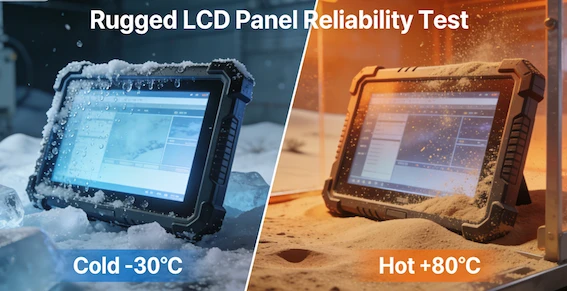
Vibration requirements vary depending on the equipment. A display on a stationary control panel faces different stresses than one mounted on a moving crane or drilling rig.
Dust and water protection is critical too. In many cases, you need at least IP65 or IP66 sealing. Without proper protection, even a small amount of dust getting inside can cause big problems over time.
What Actually Works in Practice
From my experience, the most reliable solutions usually combine several features:
Industrial-grade panels are the foundation. These use stronger materials, wider temperature components, and better thermal management than consumer screens. Many also come with higher brightness - 800 to 1500 nits - so they stay visible in bright sunlight or dusty air.
For vibration, look for displays with reinforced frames, optical bonding (which glues the layers together for strength), and good mounting systems. These small details make a surprisingly big difference.
Sealing is equally important. Fully enclosed designs with no fans (fanless) and high IP ratings help keep dust and moisture out. Some of the better units I've worked with also use chemically strengthened glass that resists scratches and impacts.
In one mining project, switching to properly sealed, high-brightness rugged LCD displays cut display-related failures dramatically. The operators noticed the difference immediately - clearer screens even in dusty conditions and far fewer service calls.
Real Applications Where These Displays Shine
You'll find these LCD displays in harsh environments being used in many places:

- Factory automation lines and control rooms
- Heavy construction and agricultural machinery
- Mining and oil & gas equipment
- Outdoor information kiosks and digital signage
- Marine and port equipment
Each application has slightly different needs, which is why one-size-fits-all solutions rarely work well.
Choosing the Right Display
When selecting a display, I always recommend starting with your actual conditions rather than just looking at specs on paper.
Ask yourself: What's the real temperature range? How much vibration is there? How dusty or wet will it get? Do operators need touch functionality with gloves?
It's also smart to think about long-term availability. Industrial displays usually have much longer product life cycles than regular monitors, which helps avoid costly redesigns later.
A common mistake is trying to save money by using standard monitors with some extra enclosures. In most cases, it ends up costing more in downtime and replacements.
Small Things That Help Extend Lifespan
Even with good equipment, how you install and maintain it matters. Proper mounting to reduce vibration stress, keeping seals intact, and occasional external cleaning can add years to the display's life. In very dusty areas, I've seen teams schedule simple external cleaning every few weeks and it made a noticeable difference.
FAQ
Q: Can I use regular consumer monitors in harsh environments?
A: Generally no. While you might get lucky in mild conditions, regular monitors usually fail quickly when exposed to high heat, vibration, or heavy dust. The cost of frequent replacements and downtime almost always ends up higher.
Q: What is the best LCD for high temperature environments?
A: Look for true industrial-grade or wide-temperature rugged LCD displays that are rated for at least -20°C to +70°C. For extremely hot environments, some specialized models can handle up to +85°C with reinforced backlights and good thermal design.
Q: How important is IP rating for dusty environments?
A: Very important. IP65 is usually the minimum for dusty areas. IP66 or IP67 is better if the display might also be exposed to water jets or heavy cleaning. The higher the rating, the better the protection against dust ingress.
Q: Does optical bonding really make a difference?
A: Yes, it does. Optical bonding increases screen strength, improves visibility by reducing reflections, prevents fogging, and helps the display better withstand vibration. It's one of the upgrades I recommend most often.
Q: How long can a good rugged LCD display last in harsh conditions?
A: With the right specifications and proper installation, many industrial LCD units last between 7 to 10+ years. This is significantly longer than consumer displays in the same environment.
Q: Should I choose a fanless design?
A: In dusty or high-vibration environments, fanless is usually much more reliable. Fans tend to suck in dust and eventually fail, while fanless designs with good passive cooling are more stable long-term.
Q: Is touch functionality reliable in harsh environments?
A: It can be, but you need the right type. Wide-temperature projected capacitive (PCAP) touch with glove support and strong sealing works well in most industrial settings.
Final Thoughts
The technology continues to improve. We're seeing better thermal management, tougher materials, and smarter designs that can monitor their own condition. For companies operating in harsh environments, these advances are making reliable displays more achievable than ever.
Using LCD displays in harsh environments is challenging, but it doesn't have to be a constant headache. With the right rugged LCD display and proper planning, you can achieve stable performance and significantly reduce maintenance issues.
It's mostly about understanding your real conditions and choosing equipment designed for them, rather than hoping something standard will survive.
I'd be interested to hear about your experiences. What kind of environment are you dealing with, and what problems have you faced with displays? Feel free to share in the comments.


At Minghua, we help companies find and develop custom LCD solutions for tough operating conditions. If you're facing challenges with displays in high-temperature, high-vibration, or dusty environments, we'd be glad to share our experience and see how we might help.
Thanks for reading. Hope this gives you some useful ideas for your own projects.


