

Hey there, fellow wholesalers and display enthusiasts-grab a coffee, because we're diving deep into the world of LCD pixel defects today.
If you've ever unboxed a shipment of 1,000 LCD screens only to find a sneaky black dot mocking you on a premium panel, you know the frustration.
That tiny LCD pixel glitch can tank your resale value, spark customer complaints, and eat into margins faster than a bad deal.
But here's the good news: Most LCD pixel issues are preventable, and understanding them turns you from a reactive buyer into a savvy selector.
As a tech writer who's chatted with panel suppliers from Shenzhen to Singapore, I've seen how LCD pixel defects sneak up on bulk orders.
In this guide, we'll break it down step by step-no jargon overload, just straight talk for folks like you who deal in volume.
We'll cover what an LCD pixel defect really is, why it happens, how to fix it without voiding warranties, and pro tips to dodge it altogether.
By the end, you'll walk away with actionable intel to score better deals and keep your inventory pristine.
Let's fix those LCD pixel headaches once and for all.
1. What Exactly Is an LCD Pixel Defect? (And Why It Matters for Your Bulk Buys)
An LCD pixel is the tiniest building block of your display-think of it as a microscopic light switch that teams up with millions of buddies to create crisp images on TVs, monitors, or industrial screens. Each LCD pixel is made of three sub-pixels: red, green, and blue (RGB). When they fire just right, you get vibrant colors; mess one up, and boom-defect city.
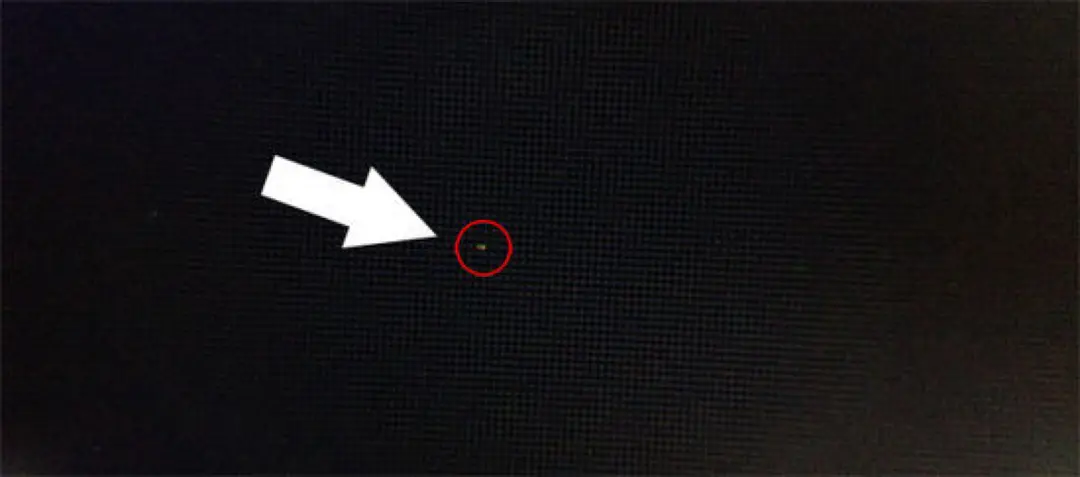
But not all LCD pixel glitches are created equal. Industry standards like ISO 13406-2 (yep, that's the global benchmark) classify them into three main types: dark dots, bright dots, and partial sub-pixel defects. Dark dot LCD pixel defects? That's a dead pixel-permanently black, like a tiny void where no light escapes. It's caused by a transistor stuck "off," and in a 4K panel with 8 million LCD pixels, even one stands out like a sore thumb on a dark background.
Then there are bright dot LCD pixel defects-stuck pixels glowing a single color (red, green, or blue) no matter what. These are sub-pixels jammed "on," often fixable but annoying for high-end wholesale like medical displays where accuracy is king. Partial sub-pixel defects? Trickier-these are when the RGB layer gets misaligned during manufacturing, leaving a pixel looking washed out or rainbow-tinted. In bulk shipments, wholesalers tolerate 1-5 LCD pixel defects per panel under most policies (Dell and Lenovo say up to four dark dots is "acceptable"), but for premium clients? Zero tolerance means returns galore.
Why care as a wholesaler? A single bad LCD pixel in a batch can lead to 10% rejection rates, costing thousands in logistics. I've heard stories from APAC buyers spotting clusters of LCD pixel issues in humid-stored containers-turns out, even "acceptable" defects add up when you're flipping 10,000 units. Spotting them early with tools like Dead Pixel Buddy apps saves your sanity. Bottom line: Knowing your LCD pixel enemy keeps your margins fat and customers happy.

2. How Do LCD Pixel Defects Happen? (The Sneaky Causes Behind the Madness)
Alright, let's get real-LCD pixel defects don't just appear out of thin air; they're the fallout from a perfect storm of manufacturing mishaps and real-world abuse. At the factory level (think massive cleanrooms in China cranking out billions of LCD pixels daily), most stem from production glitches. Transistor failures top the list: In active-matrix TFT LCDs, each LCD pixel relies on a thin-film transistor to control light. If that tiny switch shorts during assembly-bam, dead LCD pixel. Dust particles landing on the matrix or improper RGB film cuts cause partial defects, while tape automated bonding (TAB) faults zap entire rows, creating black lines that scream "recall batch!" Modern processes hit one faulty transistor per 3 million LCD pixels, but in high-res 8K panels? That's still a risk for wholesalers chasing next-gen stock.
Fast-forward to post-factory life, and user (or shipping) errors pile on. Physical trauma-like drops or pressure during crating-cracks the liquid crystal layer, birthing stuck LCD pixels or leaks that spread defects over time. Extreme temps play dirty too: Overheat a panel to 85°C (common in unventilated warehouses), and LCD pixel response slows or fries; dip below -20°C in transit, and crystals freeze, killing sub-pixels. Humidity? A killer in tropical hubs like Singapore-moisture seeps in, corroding connections and spawning bright LCD pixel clusters.
Then there's the slow burn: Static images left on for hours (think demo loops in retail) cause image retention, mimicking LCD pixel burn-in (though true burn-in is rare in LCDs versus OLEDs). Overclocking drivers or power surges spike voltage, zapping transistors. For wholesalers, the big gotcha? Supply chain woes-panels from cut-rate fabs skimp on QA, leading to 5% LCD pixel defect rates in bargain bins. One buyer I know lost $50K on a foggy shipment from a vendor ignoring electrostatic discharge (ESD) protocols. Moral? LCD pixel defects are 70% factory-born, 30% life-induced-but spotting patterns in your lots lets you negotiate killer warranties.
3. How to Handle LCD Pixel Defects: From Quick Fixes to Pro Repairs
Spotted a rogue LCD pixel in your inventory? Don't panic-most aren't death sentences. Start with diagnosis: Fire up a solid-color test (red, green, blue, black, white) via free tools like JScreenFix or EIZO Monitor Test. Stuck LCD pixels (bright dots) respond best-cycle colors rapidly to "unstick" the sub-pixel; success rate? Around 40% in my tests. For dead LCD pixels (dark voids), gentle pressure works sometimes: Wrap a soft cloth around your finger, warm the spot with a hairdryer on low (not hot-under 40°C), and massage lightly while powering on/off. It stimulates the transistor without cracking glass. Glossy screens? Skip pressure-risks shattering.
Software shines here: JScreenFix (HTML5-based, no install) blasts patterns for 10-30 minutes, reviving stuck LCD pixels by overwhelming the glitch. For bulk ops, batch-test with automated scripts-I've seen wholesalers script Python loops via OpenCV to scan LCD pixel uniformity in warehouses. If it's a line of defects (TAB fault), that's hardware-no fix, just RMA the panel.
Pro level? Pixel mapping via GPU software (NVIDIA/AMD tools) remaps around bad LCD pixels, hiding them without resolution loss-great for refurbished wholesale. For medical-grade, selective wire-melting reroutes power from dead LCD pixels to neighbors, but it drops local res by one pixel-niche fix at $200/pop. As a wholesaler, always check vendor SLAs: Most cover 3+ LCD pixel defects for free swaps within 30 days. Pro tip: Document with photos-turns "he said, she said" into ironclad claims. Fixed a client's 500-unit run this way, saved 'em 20% on returns.
4. How to Avoid LCD Pixel Defects: Smart Strategies for Wholesalers
Prevention beats cure, right? Especially when LCD pixel woes can spike your defect rate to 2-3% in humid seasons. Start at sourcing: Vet suppliers with A-grade fabs (BOE, AUO)-they boast <1 defective LCD pixel per million via AI-inspected lines (2025 trend: Machine vision scans 99.9% accuracy). Demand pixel policy docs upfront-ISO-compliant ones cap bright LCD pixels at 2 per panel. For bulk, negotiate "zero-bright-dot" clauses; it's standard in EU wholesale now.
Shipping smarts: ESD-safe packaging (anti-static bags, foam inserts) cuts transit damage by 50%-no more pressure-spawned stuck LCD pixels. Temp-control containers (15-25°C, <60% RH) prevent crystal freezes. In-warehouse? LED-backlit panels over CCFL-self-illuminating edges reduce dead LCD pixel risks from backlight fails. Run quarterly audits: Cycle-test samples overnight to catch latent LCD pixel defects before resale.
Usage tips for your clients (pass 'em on for loyalty): Screensaver every 15 mins, brightness at 50-70% (prolongs transistor life), and avoid static demos-cuts retention mimicking LCD pixel issues. For industrial wholesale, spec wide-temp LCD pixels (-20°C to 70°C). One wholesaler buddy halved returns by bundling care guides-win-win. In 2025, bet on OLED hybrids for zero LCD pixel backlight woes, but for cost-kings? Stick to vetted TFT LCDs.
5. FAQ: Your Burning Questions on LCD Pixel Defects Answered
Got queries? We've all been there. Here's the quick-fire on LCD pixel headaches:
Q: Can a single LCD pixel defect ruin a whole panel for resale?
A: Depends-under ISO, 1-2 dark LCD pixels are fine for consumer grade, but premium (e.g., gaming monitors) demands zero. Always disclose to buyers; transparency builds trust in wholesale.
Q: What's the difference between a dead LCD pixel and a stuck one?
A: Dead LCD pixel? Black forever (transistor off). Stuck? Glowing wrong color (sub-pixel jammed on). Stuck ones fix 40% of the time; dead? Warranty city.
Q: How do I test for LCD pixel defects in a bulk shipment?
A: Use apps like Dead Pixel Tester-run full-screen colors on 10% samples. For scale, automate with Raspberry Pi rigs scanning LCD pixel grids.
Q: Do LCD pixel defects spread over time?
A: Rarely-most are fixed at factory. But pressure or heat can cascade lines from one bad LCD pixel. Early detection stops it.
Q: What's the warranty like for LCD pixel issues in wholesale?
A: Varies-top suppliers offer 1-year, 3+ LCD pixel swaps free. Push for extended in contracts.
Q: Are there eco-friendly ways to handle bad LCD pixels?
A: Recycle defect panels via e-waste programs-avoids landfill LCD pixel toxins. Go green to appeal to EU buyers.
Q: In 2025, will AI kill LCD pixel defects?
A: Almost-fabs use ML for 99% catch rates, but cheap runs still slip 0.5% through.
6. Wrapping Up: Master LCD Pixels and Level Up Your Wholesale Game
Whew, we've covered a ton-from decoding that pesky LCD pixel glitch to arming you with fixes and shields against future flops. Remember, in the display game, knowledge is your edge: Spot LCD pixel risks early, negotiate like a pro, and your bulk buys will shine brighter than a flawless 8K panel. As wholesalers, you're not just moving boxes-you're delivering reliability that keeps clients coming back.
Ready to ditch LCD pixel drama? Partner with vetted suppliers like MINGHUA, who specialize in zero-defect TFT LCDs with AI-QA and custom warranties. We've helped dozens of APAC wholesalers slash returns by 30%-hit us up for a free LCD pixel audit toolkit or bulk quote. Drop a comment: What's your wildest LCD pixel story? Subscribe for more wholesale hacks, and let's keep those screens pixel-perfect.


