

When a military display suddenly goes black or starts glitching in the middle of an exercise, things get stressful fast. I've been around these systems long enough to know that the question always comes up: do we try to repair it, or is it better to just replace the whole thing?

There's no easy answer. A military display failure can happen for all kinds of reasons, and the decision between repair and replacement depends on the situation, the budget, how urgent the mission is, and how old the equipment is. In this guide, I'll share what I've learned from real cases to help you make smarter calls.
Why Military Displays Fail So Often
Military monitors aren't like the ones you see in an office. They get shaken around in vehicles, baked in the desert, frozen in the mountains, and hit with salt spray at sea. Add in electromagnetic interference and constant heavy use, and it's no surprise they eventually run into problems.

The most common issues I see include:
- Complete black screens or sudden power loss
- Flickering, vertical lines, or dead pixels
- Touch function stopping working (especially with gloves on)
- Backlight getting dim or uneven
- Signal problems or connection failures
- Physical cracks or damage from impacts and vibration
A lot of these problems come from years of service under tough MIL-STD conditions. Units that were state-of-the-art a decade ago are now struggling with newer systems and increased demands.
How to Decide: Repair or Replace?
This is the part where most people get stuck. I usually tell teams to ask themselves a few practical questions first:

- How old is this display, and how much life does it probably have left?
- Is this piece of equipment critical right now for the mission?
- How much will the repair actually cost compared to buying a new one?
- How long will the system be down if we repair it?
- Are spare parts even available?
In my experience, if the display is fairly new and the problem is isolated - like a failed backlight or a damaged cable - repairing it often makes sense. But if the unit is already 7 or 8 years old and showing signs of general wear, replacement is frequently the better long-term move.
I've seen cases where a relatively cheap repair gave another year or two of service. But I've also watched teams waste money fixing the same old unit multiple times when replacing it would have saved time and headaches in the end.
A Simple Troubleshooting Process
Before you decide anything, you need to figure out exactly what's wrong. Here's a straightforward approach that works in the field:
- Check for obvious physical damage or loose connections.
- Test the power source and try different input signals.
- Run any built-in diagnostics the system has.
- Isolate the problem - is it the screen, the touch layer, the main board, or something else?
- Think about recent conditions - was there extreme heat, heavy vibration, or a power surge?
- Document everything carefully.
Taking good notes helps later when you need to explain your decision to logistics or command.
When Repairing Is Usually Worth It
Many military monitor repair jobs are practical and cost-effective. Common fixes that often make sense include replacing the backlight, fixing touch overlays, resealing gaskets for waterproofing, or replacing damaged connectors.
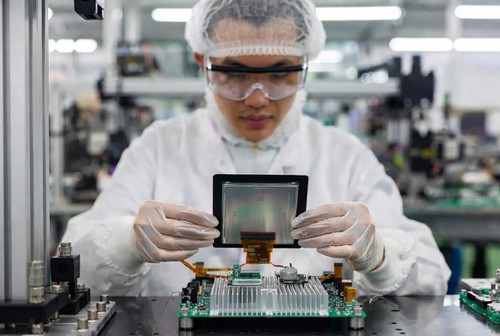
For example, I remember one unit dealing with vehicle displays that kept losing signal because of vibration. A reinforced connector repair and better sealing solved most of the problems without needing full replacements. In cases like this, a good repair shop that understands military standards can extend the life of the equipment significantly while keeping everything compliant.
The important thing is making sure the repair is done properly so it still meets shock, vibration, and environmental requirements.
When You Should Just Replace It
Sometimes it's better to cut your losses and go for a new unit. Clear signs that point toward replacement include:
- The display has already been repaired several times
- Multiple different problems appearing at once
- Parts are obsolete and hard to find
- The old unit can't keep up with new software or performance needs
- Downtime for repair would hurt training or operations too much
Newer rugged military displays come with real improvements - much better sunlight visibility, lower power use, lighter weight, and stronger overall reliability. In many modernization programs, fixing a failure becomes a good opportunity to upgrade.
Looking at the Real Costs
You can't just compare the immediate repair price to the cost of a new monitor. A repair might look cheaper at first, but if the unit fails again soon, you end up paying more in the long run.
Replacement often brings:
- Full new warranty
- Latest technology and better performance
- Fewer future maintenance headaches
When you add up downtime, shipping costs, technician time, and potential mission impact, the math sometimes favors replacement more than people expect. In most units I've worked with, a well-chosen new display pays for itself within a few years.
Lessons from Real Situations
I've seen an Army unit in rough terrain repair some vehicle displays with optical bonding issues but replace the oldest ones in the fleet. That mixed strategy helped control immediate spending while planning for future upgrades.

In another case on a naval vessel, a relatively new console display got damaged by heavy shock. Because it was still young, they repaired it quickly and kept the system running. But on older ships, teams are now using scheduled maintenance periods to replace multiple units at once and avoid repeated problems.
Every situation is different, which is why a rigid "always repair" or "always replace" policy usually doesn't work well.
How to Prevent Problems Before They Start
The smartest strategy is avoiding failures in the first place. Some things that help include:
- Following proper maintenance schedules and cleaning procedures
- Using good mounting systems to reduce vibration damage
- Training operators to spot early warning signs
- Choosing displays that are truly built for your specific environment from the beginning
Working with suppliers who can customize displays to your exact platform needs can also cut down on future headaches significantly.
Final Thoughts
Deciding whether to repair or replace a military display is never black and white. It comes down to balancing immediate needs with long-term costs and readiness. The goal is always to keep your systems operational when it really matters while being responsible with resources.
If your team is dealing with recurring military display failure issues, taking a structured approach usually leads to better decisions.


At Minghua, we specialize in custom LCD solutions for military and rugged applications. Whether you need help evaluating repair versus replacement options, component-level military monitor repair, or completely custom-built displays designed to your exact specifications, we can support you.
We work directly with defense clients to deliver tailored military displays - specific sizes, enhanced durability features, special interfaces, and full compliance with required standards. If you're facing equipment challenges or planning an upgrade, feel free to reach out. We're happy to discuss your situation and see how we can help.


