

Hey guys, if you've ever been in a factory control room or looking at a production line dashboard and thought, "Why do these screens all look different even though they're showing the same thing?" – one has a weird yellow cast, another is super blue, and the brightness is all over the place – you're not alone. It's super annoying, and in places like manufacturing plants or assembly lines where people rely on those industrial LCD displays for important data, it can cause real problems. Misreading info, getting eye strain after long shifts, or even missing something critical because the colors aren't consistent.
In this post, I'm going to talk about why this happens with industrial LCD monitors and industrial LCD panels in multi-screen setups, and more importantly, how to actually fix it. These tips come from real-world stuff I've seen in factories – monitoring stations, big kanban boards on the shop floor, that kind of thing. Let's break it down step by step.
Why Do Multiple Industrial LCD Monitors Often Look Different from Each Other?
Okay, first off, industrial LCD panels are built to handle tough stuff – heat, dust, vibrations, running 24/7 – but they're not always perfect when it comes to matching colors right out of the factory. Even if you buy a bunch of the exact same model, there can be small differences because of how they're made.
Things like variations in the backlight LEDs, tiny differences in the liquid crystals, or even the coatings on the screen can make one panel warmer or cooler than another. And over time, in a hot factory environment, backlights age differently, or dust builds up, making it worse. In a big multi-monitor wall for production tracking, it ends up looking like a quilt instead of one smooth picture, which makes comparing data harder.
I've read a ton of reports on this – stuff like "mura" where you get cloudy spots or uneven patches, especially on gray backgrounds. It's not a huge deal for a home TV, but when operators are staring at industrial LCD displays all day, it really adds up.
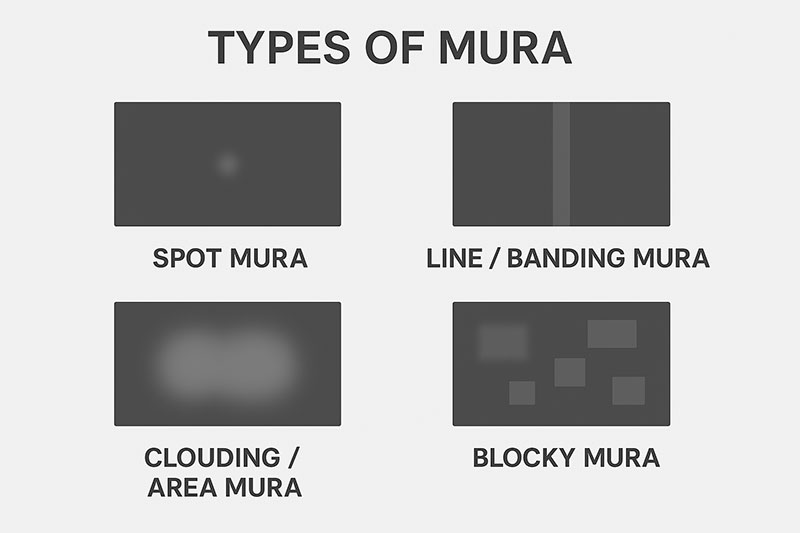
What Usually Causes These Color and Brightness Mismatches in Factory Setups?
From what I see in a lot of industrial cases, here are the main reasons:
- Just How They're Made – There's always some tolerance in industrial LCD monitor production. Colors, brightness, white balance – they can vary a bit batch to batch.
- Backlight Differences – Those LED backlights don't age the same way, especially in bright models for well-lit factories.
- The Environment – Temperature changes, dust, even the lights in the room can shift how colors look.
- Wear and Tear Over Time – Screens running non-stop fade or shift colors faster.
- No Calibration from the Start – A lot of units come with default settings that crank up brightness but ignore matching.
In video wall or dashboard setups, all this stacks up and makes things look off.
How to Fix It: Practical Ways to Get Consistent Colors Across Your Industrial LCD Displays
The good part? You can totally sort this out. Here's what actually works in real factories.
1. Go for Panels That Are Calibrated at the Factory
Best move is picking suppliers who do color matching before shipping. Some offer industrial LCD panels that are batch-tested and adjusted so colors are super close (like really low Delta E values for accuracy).
Ask for options with uniformity fixes or optical bonding – it helps a lot with reflections too.
2. Calibrate On-Site with Proper Tools
If you've already got the screens, grab a colorimeter like the X-Rite or Datacolor ones. Hook it up to software and measure each industrial LCD monitor.
Basically:
- Set everything to the same targets (like 6500K white, standard gamma, matching brightness).
- Check uniformity in different spots.
- Adjust profiles or the monitor's settings if it allows.
Pick one as the "main" and match the rest to it. Works great even in dusty places if you get rugged tools.
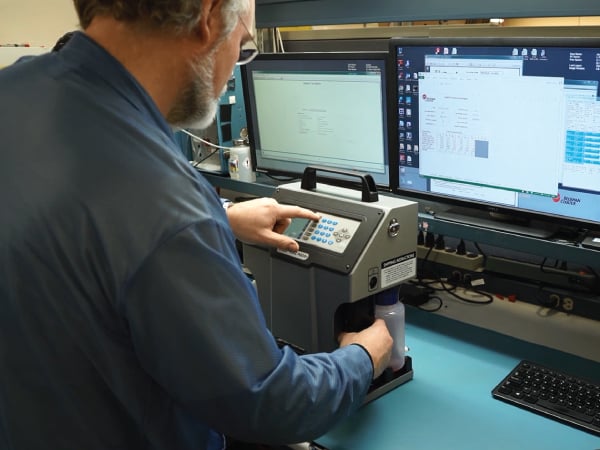
3. Use Software to Help Match Things Up
Free tools like DisplayCAL are awesome for this. It handles multiple screens and tweaks via your graphics card.
For bigger setups, some brands have network tools to calibrate remotely. Turn on any built-in uniformity modes if your industrial LCD display has them.
Just re-do it every few months as things drift.
4. Extra Tips for Big Dashboards or Multi-Screen Walls on Production Lines
Match refresh rates and resolutions through your GPU settings.
Use anti-glare stuff or bonding to cut down on outside light messing things up.
Stick to the same batch for one wall – minimizes differences from the start.
5. Keeping It Consistent Long-Term
Clean the screens regularly, control the room lighting if you can, run quick test patterns now and then.
Replace old ones in groups so you don't mix ages.
A lot of places see huge improvements – way less strain and better accuracy.
Wrapping It Up: Making Your Factory's Industrial LCD Monitors Look the Same
At the end of the day, getting all your industrial LCD displays to match in color and brightness isn't that complicated if you plan ahead. Choose good ones, calibrate properly, and maintain them – it'll make a big difference in how smooth things run on the floor.
If you're dealing with this issue right now, start small and you'll see results quick.
Now, about Minghua Display – we're the folks who make custom industrial LCD displays, industrial LCD monitors, and industrial LCD panels specifically for places like yours.
We've been doing this for over 15 years, focusing on stuff that lasts in rough factory conditions – 24/7 operation, high heat or cold, dust, you name it.
The thing clients love most is our customization. We can build exactly what you need: sizes from 7-inch up to huge ones, super bright (2000 nits if it's sunny), wide temp ranges (-30 to +80°C), tough coatings to fight glare and fingerprints.
And yeah, we do factory-level color calibration and batch matching so when you get a bunch for your production dashboards or multi-monitor setups, they all look identical from day one. No more wasting time fixing mismatches on-site – Delta E under 2, great uniformity.
We use IPS for wide angles, offer IP-rated enclosures, all the interfaces you might want (HDMI, DP, VGA, custom stuff), open frame or full mounts.
Our customers are in cars, electronics, food plants, logistics – they stick with us because the screens just work reliably, and visuals stay consistent shift after shift.
Need standard models or something totally custom (even your branding)? We handle samples fast, good prices on volume, and help after the sale, including tips on keeping calibration spot-on.
If you're ready to ditch the inconsistent screens and get something reliable, hit us up for a quote or chat. We'll sort out the perfect industrial LCD display solution for your factory.
Let's get your lines looking sharp and uniform!


