

LCD screen discoloration is one of the most frequent issues users encounter. It typically appears as yellowing, brownish, or reddish tints across the screen, or as irregular dark and white spots. These problems are usually caused by degrading liquid crystals inside the panel, aging or worn-out backlights (whether old CCFL tubes or modern LED arrays), prolonged overheating, or physical pressure applied to the screen.
In many cases, the discoloration starts subtly near the edges or corners and gradually becomes more noticeable over time. Some issues can be improved through simple solutions such as recalibrating the color settings, updating graphics drivers, improving ventilation to lower the temperature, or replacing the backlight module.
However, not all discoloration can be fixed easily. When the damage is caused by physical pressure - such as pressing too hard on the screen or uneven mounting - the problem is often permanent and may require full panel replacement.
What Does Discoloration on an LCD Screen Look Like?
LCD screen discoloration isn't one single defect. It shows up in different ways, and each pattern usually points to a different cause.

The most common signs include:
- Yellow or brown spots - often starting near the edges or corners and slowly getting worse.
- Uneven color tinting, where one side of the screen looks warmer or cooler than the other.
- Rainbow or iridescent patches that shimmer like oil on water.
- Dark shadows or blotches, especially along the edges.
Yellow spots on LCD are probably the most reported issue. They frequently come from heat damage, degrading adhesives, or moisture getting into the panel stack and messing with the optics.
Uneven tinting is often tied to the backlight aging unevenly or shifts in LED color temperature. Rainbow patches are classic pressure damage LCD discoloration - the liquid crystals get squeezed out of alignment and create interference patterns. Dark blotches can mean the backlight is failing or the diffuser sheets have shifted.
Discoloration vs. Other Common Screen Issues
It's easy to mix these up, so here's a quick comparison:
- LCD discoloration: Irregular patches, tints, or spots that spread or have soft edges. Caused by heat, pressure, aging, etc.
- Dead pixels: Single fixed dots, usually from manufacturing or impact.
- Screen burn/ghosting: Faint previous images (more common on OLED/plasma).
- Mura: Cloudy, uneven brightness areas from factory inconsistencies in the liquid crystal layer.
| Defect Type |
Visual Appearance |
Primary Cause | Permanent? |
| LCD discoloration | Patches, tints, spots - irregular shapes | Heat, pressure, aging, manufacturing | Often yes |
| Dead pixel | Single dot, always same color | Manufacturing defect, physical damage | Yes |
| Screen burn / ghosting | Ghost image of previous content | Static content, pixel aging (OLED/plasma) | Sometimes |
| Mura defect | Cloudy, uneven luminance regions | Cell gap variation, LC injection flaws | Yes (manufacturing) |
| Pressure marks | Rainbow / dark spots where force applied | Mechanical stress to panel | Sometimes fades |
Key tip: If the defect is perfectly round or rectangular, it's more likely a backlight or contamination issue than true panel discoloration.
What Causes Discoloration on LCD Screens?
Most people jump straight to "the panel is dying" and order a replacement, but that's often not necessary. Understanding what causes discoloration on LCD monitor helps you decide the right fix and how to avoid it next time.

Here are the five main culprits:
- Pressure Damage
This is super common in the field. LCD panels hate being squeezed. Too much force during shipping, mounting, or even heavy cleaning can compress the liquid crystal layer. The result? Rainbow swirls or dark patches exactly where the pressure hit. Light pressure marks sometimes fade in a day or two once you remove the stress. Heavy ones are usually permanent. Common mistakes: over-tightening screws, bad bezel fit, or stacking stuff on the screen during transport.
- Heat Exposure
Heat quietly destroys LCD panels over time. Running above 60°C for long periods degrades the liquid crystals, polarizers, and adhesives, leading to yellowing that often starts near the edges (close to the hot backlight). In enclosed industrial boxes or high-brightness setups, trapped heat makes this much worse. Sunlight adds UV damage too, especially for outdoor screens.
- Polarizer and Adhesive Aging
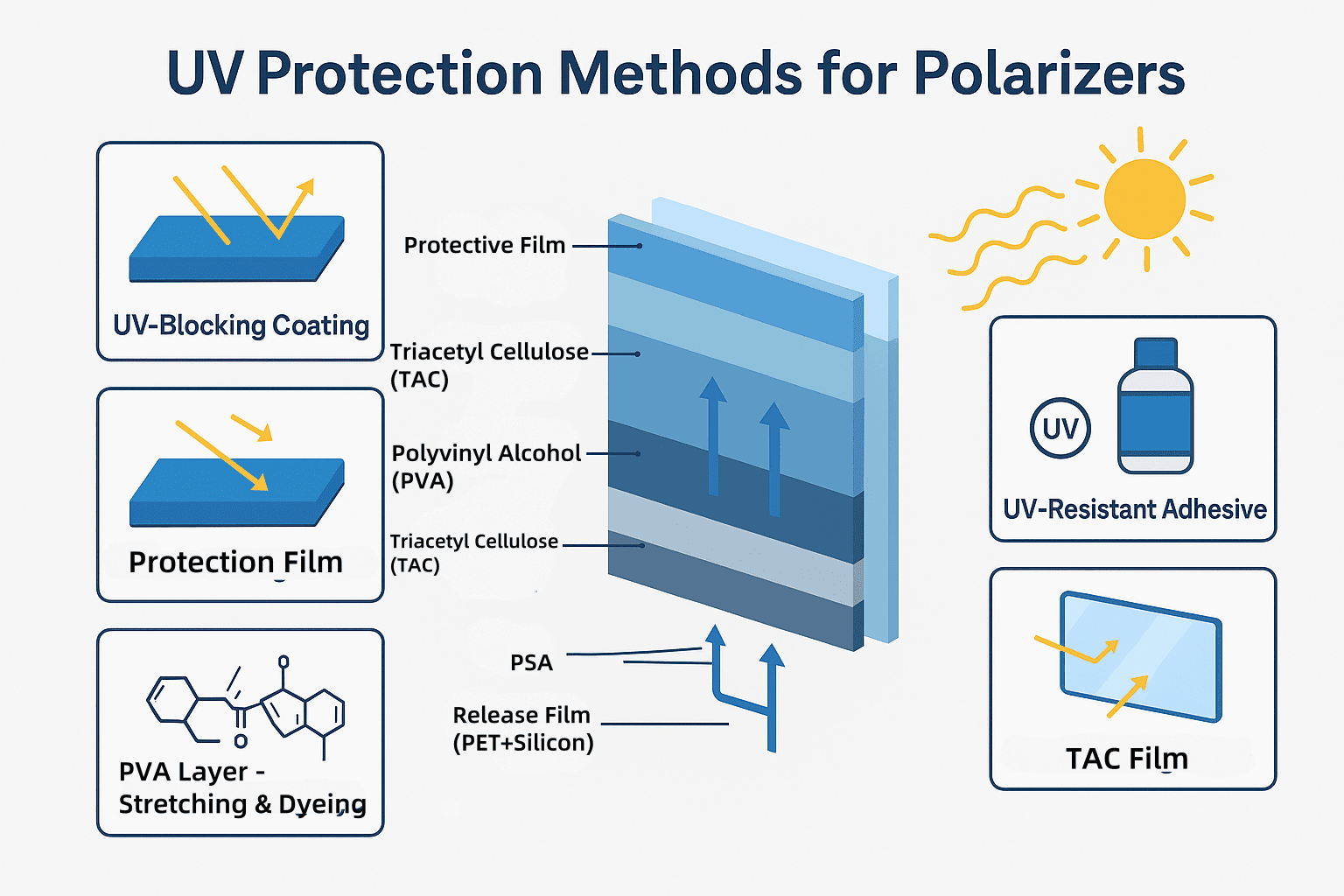
The polarizer films on both sides of the glass can yellow over time from heat and UV. This usually creates a more uniform amber tint across the whole screen rather than isolated spots. Once the polarizer or optical adhesive starts breaking down, it's hard to fix without replacing layers.
- Backlight Failure
LEDs don't all age at the same rate. Some dim faster, causing color temperature shifts (one side bluer, the rest warmer) or dark bands. The good news? The LCD panel itself might be fine - you may only need to fix or replace the backlight module.
- Manufacturing Defects (Mura)
Mura shows up as subtle cloudy patches, especially visible on gray or mid-tone screens. It's usually from tiny variations in cell gap or liquid crystal fill during production. Tight process control from good suppliers reduces this a lot.
How to Fix Discoloration on LCD Screen
Don't rush into swapping the whole panel. Run through a quick diagnostic first:
- Is the issue on the whole screen or just in one area?
- Connect the device to a different known-good monitor or input. If the problem disappears on an external display, it's likely software, drivers, or calibration - easy fix.
- If it stays, it's hardware: panel, backlight, or connections.
Realistic repair chances:
- Minor pressure marks: Sometimes fade if you relieve the pressure quickly.
- Software/color profile issues: Usually fixed with calibration or driver updates.
- Heat damage, severe pressure, polarizer failure, or bad mura: Mostly permanent - you'll need panel or backlight replacement.
Rule of thumb: Sudden appearance after impact or moving? Think pressure damage LCD discoloration first. Gradual over weeks/months? Probably heat or backlight aging. There from day one? Manufacturing defect.
How to Prevent Discoloration in TFT LCD
Prevention beats repair every time, especially for industrial or long-life products.
- Reduce mechanical stress: Leave a little clearance (0.3–0.5mm) around the panel so thermal expansion or vibration doesn't crush it. Use proper gaskets and avoid over-torquing mounts.
- Improve thermal management: Add gap pads, ventilation, or brightness derating in hot enclosures. For outdoor use, pick UV-resistant polarizers.
- Choose better materials: Go for industrial-grade panels with wider temperature ratings, better LED binning, and derated backlights (run them at 70-80% capacity for much longer life).
In tough environments like HMIs, medical monitors, or outdoor signage, these steps cut LCD screen discoloration dramatically.
For custom TFT LCD projects, working with a supplier who understands your specific conditions (vibration, temperature swings, cleaning chemicals, etc.) lets you spec anti-pressure bezels, high-temp materials, and proper bonding from the start.
Quick Diagnostic Checklist
- Localized or full-screen?
- Any signs of recent pressure or impact?
- Has the unit been running hot?
- Test a uniform gray screen in a dark room to check backlight uniformity.
- Does the problem show up even in BIOS (before the OS loads)?
If it's stable hardware damage visible at startup, plan for replacement. If it changes with inputs or settings, start with software.
FAQ
Q: What causes yellow spots on LCD?
A: Usually heat degrading materials or adhesives, sometimes pressure or moisture. Edge spots often tie back to backlight heat.
Q: Can pressure cause discoloration on LCD screens?
A: Absolutely. It misaligns the liquid crystals and creates rainbow or dark patches. Mild cases can recover; bad ones don't.
Q: Is LCD discoloration permanent?
A: Depends. Software issues are easy. Minor pressure might fade. Heat damage, polarizer aging, and severe pressure usually need hardware replacement.
Q: How do industrial displays prevent discoloration in TFT LCD?
A: Through better materials (UV-stable polarizers, wide-temp panels), smart thermal design, proper mounting tolerances, and derated long-life backlights.
Need a Custom TFT LCD Solution Built for Reliability?
At Minghua Display, we specialize in custom LCD design for industrial, medical, and outdoor applications. Our engineering team can help you specify displays that resist the exact failure modes most relevant to your environment - from anti-pressure bezel structures to high-temperature-rated panels with long-life backlights.


Whether you're facing an active discoloration problem in the field or designing a new product and want to prevent one, we offer free engineering consultation and competitive custom panel quotations.
Contact Minghua Engineering Team


